
Find the leaked passwords that still work.
Attackers replay breached logins against your app. NightVision tries them first, once, on the login you already authorized, and tells you which accounts to reset.
A leaked password is a working login until proven otherwise
Every breach dump and infostealer log is a list of sign-ins someone will try against your app. Knowing your domain appears in one tells you there is risk. It does not tell you which accounts to reset.
An exposure count: the list, not the answer
Breach monitoring tells you how many records mention your domain. Many are stale. Your help desk cannot reset everyone, so the accounts that still work wait in line with the rest.
NightVision: a verdict per account
Each matched credential gets one paced attempt on the login you already authorized for scanning. You get the short list that actually signs in.
Leaked credential testing in four steps
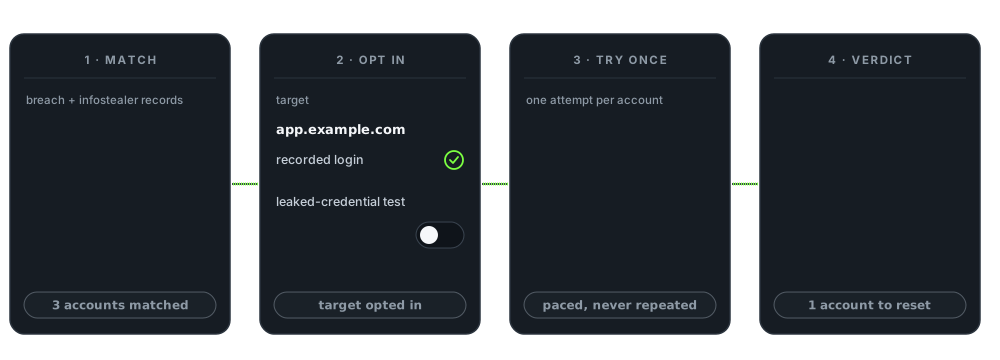
Match
Records from public breach and infostealer data are matched to your app's domain, including the sign-in subdomains your login runs on.
Opt in
You choose which targets are tested. Public targets with a recorded login qualify.
Try once
One paced attempt per account, through the login you recorded for the scan. It stops at sign-in and never answers a second factor.
Verdict
Each attempt is compared to your recorded successful login and gets one of four verdicts.
A short list of accounts to reset, not a dump of passwords
Only credentials that sign in become findings. Each one names the account, masked, and the fix.
Accepted
The leaked password signed in.
Accepted and challenged
The password worked; a second factor stopped it.
Rejected
A clean rejection. Nothing to reset.
Inconclusive
Matched neither a success nor a rejection.
Leaked credential still signs in
Critical- Target
- app.example.com
- Login
POST /login- Account
- j••••••@example.com
- Verdict
- Accepted, matched your recorded sign-in
- Source
- Infostealer log
- Password
- Never displayed
Illustrative example.
Built so the test never becomes the incident
Only the login you recorded
Credentials are tried only against the sign-in you recorded and authorized for the scan. Where a breach record says it came from is a matching signal, never a destination.
Paced and never repeated
Each account gets a single attempt per target. Attempts are spaced out instead of fired in bursts, so testing looks nothing like a credential-stuffing run.
Nothing after the login is touched
No session is kept and no page after sign-in is visited. A second factor is never supplied; reaching one is recorded as a verdict, not pushed through.
The finding, not the password
Findings show a masked account, the verdict, and the fix. The password is never displayed in the product or in reports.
You decide where it runs
Testing runs only on targets you turn on. Public targets with a recorded login qualify; private targets and header or cookie authentication are excluded.
Inconclusive is not a finding
A response that matches neither your recorded success nor a clean rejection is labeled inconclusive, so nobody resets an account on a guess.
Plan with your help desk. On an MFA-protected account, a correct password can send a sign-in prompt to the real user. That account is the one to reset first.
Leaked credential testing questions, answered.
What is leaked credential testing?
It checks whether usernames and passwords exposed in public breaches and infostealer logs still sign in to your application. Instead of a count of exposed records, you get a verdict per account, so you know exactly which accounts to reset.
Is it safe to run against a production login?
It is built for it. Testing runs only on targets you opt in, only against the login you recorded and authorized for the scan, with one paced attempt per account. It stops at sign-in, keeps no session, and never supplies a second factor.
Where do the leaked credentials come from?
From public breach and infostealer data, matched to your application's domain, including the sign-in subdomains your login runs on.
Will I see the leaked passwords?
No. Findings show a masked account, the verdict, and the fix. The password is never displayed in the product or in reports.
Which targets can be tested?
Public targets that use a recorded login and that you have opted in. Private targets and header or cookie authentication are excluded, because there is no recorded sign-in flow to test against.
What happens when a leaked credential still works?
It becomes a finding. A credential that signs in is reported as critical. One that is accepted but stopped by a second-factor challenge is reported at lower severity. The fix for both: reset the password and confirm MFA is enrolled.
What if NightVision cannot tell whether a login worked?
The result is reported as inconclusive, not as a finding. Every attempt is compared to your recorded successful login, and anything that matches neither a success nor a clean rejection is labeled inconclusive rather than guessed.
Find the working leaked logins before someone else does.
Leaked credential testing runs on the same recorded login as NightVision authenticated scanning, part of DAST.